 Rosina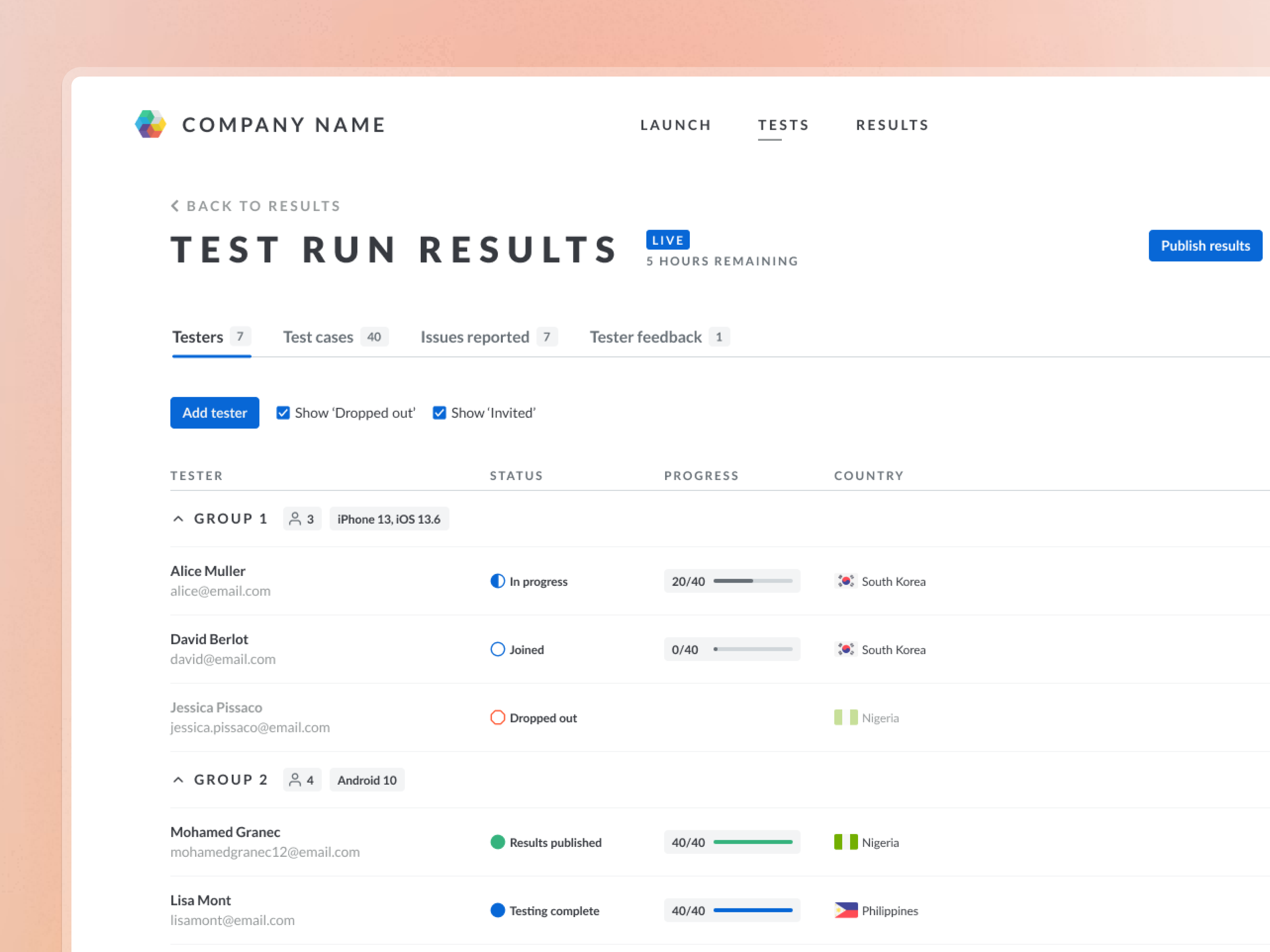
Test run results
| Tester | Status | Progress | Country |
|---|---|---|---|
| Alice Mulleralice@email.com | In progress | 20/40 | South Korea |
| David Berlotdavid@email.com | Joined | 0/40 | South Korea |
| Jessica Pissacojessica.pissaco@email.com | Dropped out | Nigeria | |
| Mohamed Granecmohamedgranec12@email.com | Results published | 40/40 | Nigeria |
| Lisa Montlisamont@email.com | Testing complete | 40/40 | Philippines |
| Jack Doejack@email.com | Testing complete | 40/40 | South Korea |
| Mary Smithsonmarysmithson@email.com | Invited | Nigeria | |
Manual coordination left less time for quality
Test Managers maintained spreadsheets to coordinate up to 15 test cycles at once. Repetitive data entry took time and increased the risk of errors.
They needed a clearer view of what was happening across their tests, with less manual work to keep it current.
Finding where test coordination created extra work
I observed six Test Managers across 12 research sessions. We mapped their activities to understand where coordination took time.
Checking progress meant piecing together information from Jira, test documents, email and Slack. Managers then had to decide who needed a reminder, help or a replacement.
The activity map revealed three connected problems:
- •Scattered information. Understanding a tester’s progress required checking several sources.
- •Repeated follow-ups. Managers checked responses and sent reminders across different channels.
- •Manual coordination. Replacing a tester involved finding someone suitable, creating a new spreadsheet and updating the test records.
This framed the design question: how could Test Managers see who needed attention and decide what to do next, with less checking across tools?
Alternatives
Direction A: Attention first
Does well: opens on what needs action, with a next step for each tester.
Why not chosen: Test Managers also need the full picture by device.
Direction B: Kanban by stage
Does well: shows how many testers sit in each stage at a glance.
Why not chosen: it loses device grouping, and cards get noisy with more testers.
Direction C: Summary per device group
Does well: gives the fastest overview of every device group.
Why not chosen: it gives up the dense, spreadsheet-like view Test Managers know.
Group by device and make progress visible
Device groups were central to how they understood test progress. That informed the dashboard’s structure: preserve the familiar table, then organise testers by device and operating system.
I chose a grouped table so Test Managers could scan a test run and focus on a particular device group.
Each row showed a tester’s status and completed test cases. Groups could be collapsed, while filters hid invited testers or those who had dropped out.
This kept the density and familiarity of a spreadsheet, while showing progress without manual updates.
Bringing data together also enabled ML features that identified strong testers and automatically invited them to future tests.
Keep human review where mistakes matter
Leadership wanted to auto-approve bug reports. Test Managers were concerned about automation mistakes reaching clients.
I used research clips to make that concern visible and proposed a narrower approach: auto-approve low-severity, high-confidence items, with human review for everything else. Leadership agreed.
The design needed to make the limits of automation clear enough for Test Managers to trust it.
The platform couldn’t support every test
Adoption was low after launch. Working with Test Managers, I found that customised tests still needed to run outside the dashboard. Around 50–60% of cases could use it.
Clarifying which tests fitted helped adoption increase. Test Managers could use the platform where it worked and recognise where their existing processes were still needed.
Less coordination. More time for quality.
- 35%
- Less operational overhead, saving each Test Manager around eight hours a week. Measured through Metabase analytics and user surveys.
- 50%
- Improvement in user satisfaction, with Test Managers reporting greater confidence in their reports.
- 28%
- Increase in test completion, supported by automated tester matching and progress tracking.